
PageFly is still worth using in 2026 if you want detailed control over Shopify product pages, landing pages, and other storefront layouts without custom development.
It now offers AI page generation, A/B testing, and analytics alongside its drag-and-drop editor, making it more than a traditional page builder.
The trade-offs are its publishing limits, learning curve, and the work involved in maintaining pages inside a separate app.
For merchants creating many types of custom pages, PageFly remains a strong option. For stores with simple design requirements, Shopify's native editor may be enough.
And for dropshippers working from supplier product links, a more specialized tool may make sense.
Here's how PageFly compares on features, pricing, performance, and long-term value.
PageFly Review: The Quick Verdict
| Category | PageFly |
| Best for | Merchants who want custom Shopify pages without coding |
| Main functionality | Visual editing, AI page generation, and conversion optimization |
| Supported pages | Product, landing, homepage, collection, FAQ, and other page types |
| Free plan | One published page or section |
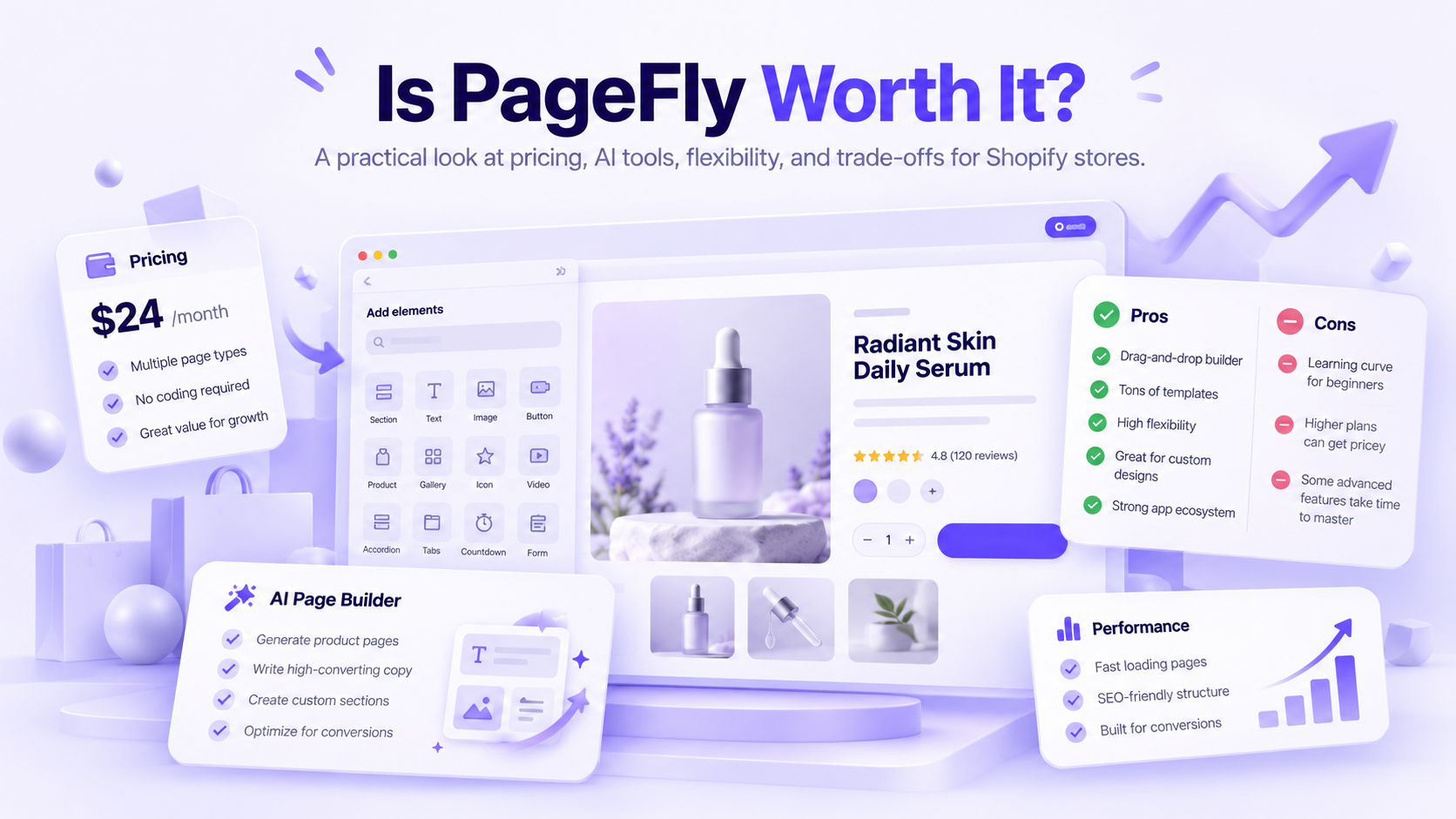
| Paid plans | From $24/month |
| Templates | 320+ advertised |
| AI features | Page generation, audits, translation, and other optimization tools |
| A/B testing | Available on eligible plans |
| Shopify App Store rating | 4.9/5 from approximately 5,900 reviews |
| Biggest strength | Detailed page design across different store requirements |
| Biggest limitation | Publishing allowances, setup time, and reliance on the app for page management |
Our verdict: PageFly is a good investment when your current Shopify theme limits the layouts you need or your team regularly creates custom campaign pages. It's harder to justify when you only need standard product templates or a faster way to prepare individual product pages.
What Is PageFly, and How Does It Work?
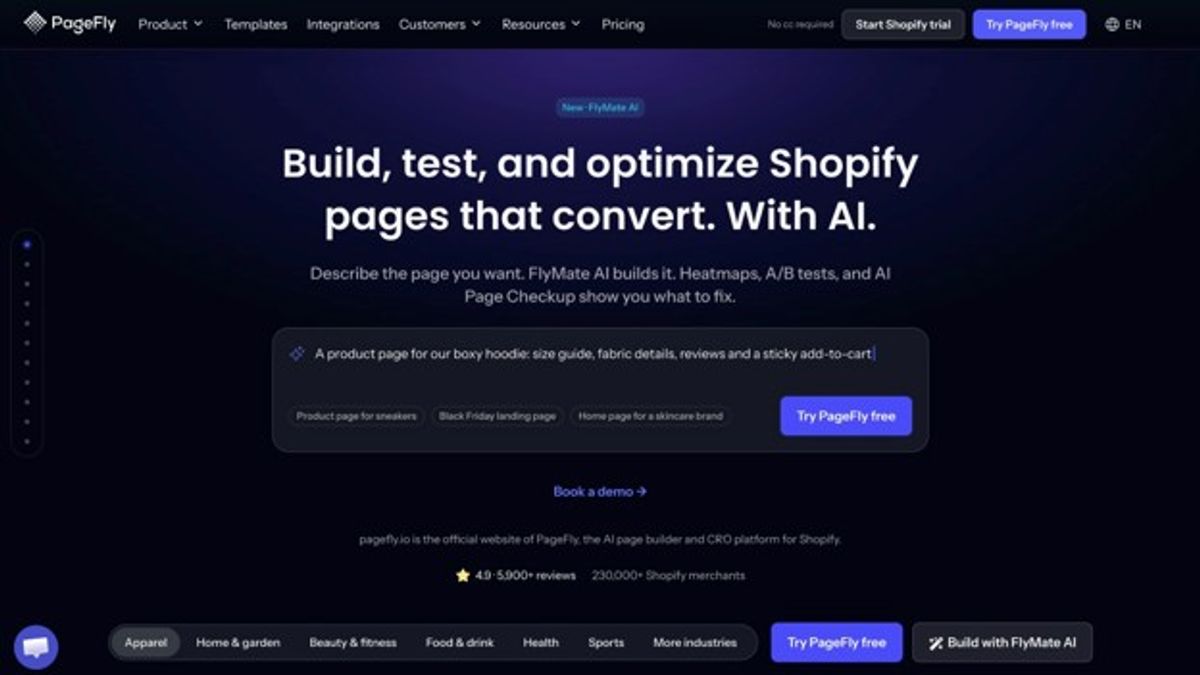
PageFly is a Shopify page builder that lets merchants create and customize storefront pages through a visual editor.
Instead of relying exclusively on the sections and templates included in your Shopify theme, you can build layouts using PageFly's own elements, templates, and design controls.
It's not limited to product pages.
You can use PageFly to create:
- Product pages with custom image galleries, product information, and purchasing sections.
- Landing pages built around advertising campaigns or promotions.
- Homepages with branded content and featured products.
- Collection pages with additional merchandising information.
- FAQ, About Us, and Contact pages.
- Reusable sections that can appear across several pages.
PageFly also integrates with Shopify product information and a range of third-party apps.
That makes it useful when you want more control over an individual page without replacing your entire storefront theme.
How Do You Build a Page With PageFly?
The process generally follows eight steps:
Install PageFly from the Shopify App Store.
Choose the type of page you want to build.
Start with a template, AI-generated draft, or blank layout.
Add and customize sections, columns, text, images, and other elements.
Connect relevant Shopify products and app integrations.
Adjust the layout for desktop, tablet, and mobile.
Preview the page and test its functionality.
Publish it to your Shopify store.
You don't need coding skills for ordinary page creation.
However, PageFly also supports custom code and CSS for merchants who want more detailed styling or behavior.
The main difference from Shopify's native editor is the level of page-specific control. You can build a layout independently of many restrictions imposed by the theme's predefined sections.
That freedom is useful, but it also means you're responsible for more design decisions.
Can PageFly Generate Pages With AI?
Yes. PageFly's current offering includes an AI page builder called FlyMate.
According to PageFly's AI builder documentation, merchants can describe the page they need and generate an editable draft.
For example, you could ask for a landing page promoting a seasonal skincare bundle, with a product introduction, benefits, customer questions, and purchasing section.
PageFly can generate the initial structure, which you can then refine using its visual editor.
Its broader AI functionality also includes:
- AI-generated pages and sections.
- AI Page Checkup for reviewing potential page issues.
- AI translation.
- AI-assisted optimization recommendations.
- Integrations with supported AI assistants.
PageFly also offers A/B testing, conversion analytics, and heatmap functionality on eligible plans.
This is an important change from earlier versions of the product.
PageFly shouldn't be described as a builder where every page must be assembled manually. Merchants can now generate a first draft and edit it afterward.
However, AI-generated content still needs review. PageFly cannot independently guarantee that product claims, images, prices, or customer promises are accurate.
How Much Does PageFly Cost in 2026?
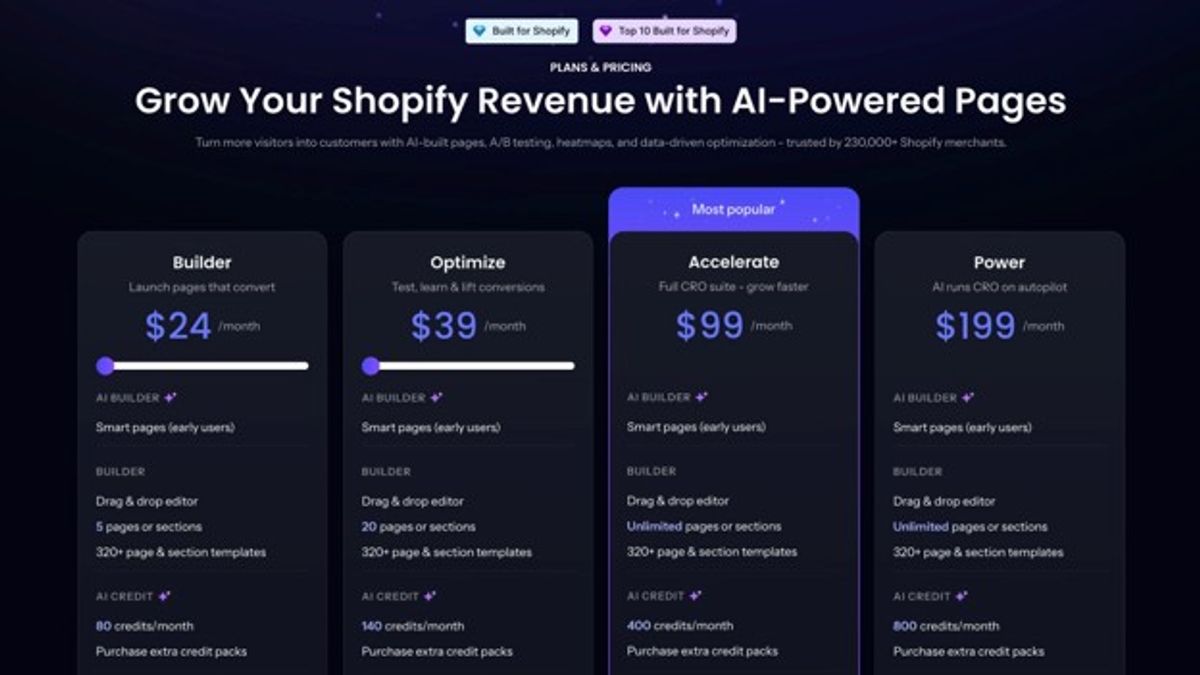
PageFly has a free plan and paid subscriptions starting at $24 per month. The cost depends on the number of published pages or sections you need, your AI credit allowance, and whether you want advanced testing and analytics.
The Shopify App Store listing currently advertises these plans:
Pricing checked October 9, 2026. The public PageFly website also advertises Optimize from $39/month and Power at $199/month, with different allowances. Confirm the plan structure offered inside your Shopify account before subscribing.
What Counts as a PageFly Publishing Slot?
PageFly uses slots to count published content.
One slot can represent a published page or a saved section.
Is PageFly's Free Plan Enough?
The free plan is useful for trying the editor and publishing one page or section.
It includes access to PageFly's advertised template library and a limited monthly AI allowance.
That makes it a reasonable way to determine whether you like the workflow before paying.
But it's not an unrestricted solution for maintaining numerous custom product pages.
A merchant planning to replace several product templates or launch frequent campaigns will likely need additional slots.
Which Paid Plan Is Worth It?
- Builder makes sense when you need several custom pages and mostly want editing, templates, and basic reporting.
- Optimize, where available, is worth investigating when you need A/B testing and additional conversion optimization functionality but don't require unlimited publishing.
- Accelerate becomes more relevant when you need numerous published pages and a wider set of CRO tools, including testing, funnels, and heatmaps.
- Enterprise is aimed at teams requiring additional technical support, monitoring, and higher AI allowances.
Don't upgrade simply because a more expensive plan includes more AI credits.
Look at the number of pages your store needs, which tools your team will actually use, and whether the additional functionality replaces separate applications.
What Can You Build With PageFly?
PageFly's main appeal is that it supports several Shopify page types within the same editing environment.
That makes it more flexible than a tool designed around one specific product-page workflow.
Custom Product Pages
PageFly lets merchants customize product presentations beyond the available layout options in their Shopify theme.
For example, a supplement brand might want a product page featuring ingredient information, sourcing details, comparison tables, and a dedicated FAQ.
Another business might prefer a simple layout with prominent images, product variants, shipping details, and a sticky purchase section.
PageFly provides elements and controls for building both approaches.
You can connect Shopify products and use supported integrations for reviews, upsells, subscriptions, and other functions.
However, the presence of those integrations doesn't mean the third-party services are included in your PageFly subscription.
For design inspiration, review these Shopify product page examples before deciding which sections your own store actually needs.
Campaign Landing Pages
This is one of PageFly's strongest use cases.
A campaign landing page might need a different headline, offer, imagery, and content sequence from the standard product page.
For example, a skincare brand advertising a starter bundle could create a dedicated landing page that explains the routine, shows the products together, addresses common questions, and presents the bundle offer.
PageFly lets the merchant build that experience without redesigning the entire store.
It also supports custom layouts for seasonal sales, influencer campaigns, and new product launches.
Homepages and Collection Pages
PageFly supports custom homepages and collection layouts.
This can help when a business wants more editorial content or merchandising flexibility than its current Shopify theme provides.
A homewares brand might create collection pages with buying guides, room photography, and information about different materials.
But first check what your theme already allows.
Some premium and free Shopify themes include extensive sections, filtering, recommendations, and customizable collection templates.
Not every store needs an additional builder.
Reusable Sections and Templates
PageFly advertises more than 320 templates and supports reusable sections.
A team could create a standard guarantee section, customer-support block, or promotional banner and reuse it across several pages.
That can make updates and brand consistency easier.
However, reused elements still need maintenance, and saved sections may count toward publishing allowances.
Templates provide a starting point, not a finished brand experience. Images, typography, product information, spacing, and mobile presentation still require checking.
A/B Testing and Analytics
PageFly now includes more conversion optimization tools than a traditional visual editor.
Depending on the plan, merchants can use:
- A/B testing.
- Conversion and funnel analytics.
- Heatmaps.
- AI Page Checkup.
- Optimization recommendations.
For example, a merchant could compare two landing-page layouts to investigate whether one generates more purchases.
That experiment is only useful if it is set up properly.
Choose a primary metric before starting, use comparable traffic, and avoid declaring a winner based on a handful of conversions.
A/B testing software makes experiments possible. It doesn't guarantee that every test produces a reliable result or a conversion improvement.
PageFly Pros and Cons
PageFly's strongest advantage is flexibility across different page types.
Its disadvantages are mainly related to publishing limits, additional design decisions, and ongoing dependence on its editing environment.
| Pros | Cons |
| Detailed visual editing without routine coding | More design choices mean more setup decisions |
| Supports product, landing, homepage, and collection pages | Can be unnecessary when the theme already meets requirements |
| AI-assisted page generation | AI allowances vary by plan |
| Large template library | Templates still require customization |
| Reusable sections and global styling | Published sections count toward applicable limits |
| Responsive editing controls | Mobile layouts need testing |
| Broad app integration support | Third-party functionality may require additional subscriptions |
| A/B testing and analytics | Advanced CRO tools require eligible plans |
| Highly rated Shopify App Store support | Downgrading and uninstalling require planning |
What Do Real Shopify Merchants Say About PageFly?
As of October 9, 2026, PageFly has a 4.9/5 rating from approximately 5,900 Shopify App Store reviews.
That is a substantial body of customer feedback, although the rating alone doesn't prove the app will suit every merchant.
Positive reviews frequently mention design flexibility and customer support.
In a review dated September 28, 2026, Paintavie praised PageFly's reusable sections and reported that support quickly helped resolve an issue.
Other merchants describe using PageFly to build branded landing and product pages beyond the layouts offered by their Shopify themes.
There are criticisms too.
Some users described difficulties building a basic page and dissatisfaction with support response times. PageFly's support manager subsequently acknowledged that the request had not been handled well.
Other users reported recurring editor access problems. The vendor apologized and responded publicly.
These are individual experiences, not evidence that every PageFly installation has the same issues, though.
The review pattern suggests a more useful conclusion: PageFly offers considerable flexibility, and many merchants appreciate its support, but ease of use and troubleshooting experiences vary.
You can read both positive and critical feedback in PageFly's Shopify App Store reviews.
Is PageFly Good for Beginners?
PageFly is beginner-friendly compared with coding custom Shopify templates, but it isn't necessarily the simplest way to create a product page.
The editor removes much of the technical work while still requiring decisions about layout, spacing, typography, mobile behavior, and content.
Beginners can benefit from:
- Ready-made templates.
- Drag-and-drop elements.
- AI-generated page drafts.
- Prebuilt sections.
- Visual previews.
- Responsive editing controls.
The difficulty comes when merchants try to customize everything at once.
A blank canvas gives you freedom, but it doesn't tell you which information customers need first or how to arrange a convincing product offer.
AI can create the initial structure, but that structure still needs to match your product, brand, and audience.
For a first project, choose one template and customize its content before attempting an entirely original design.
If your main goal is getting a product page ready from a supplier link, compare that workflow with tools designed specifically around product-page generation.
Does PageFly Slow Down Shopify or Hurt SEO?
PageFly doesn't automatically make a Shopify store slow or damage its SEO. Performance depends on how pages are built, the media they contain, scripts and integrations, the underlying Shopify theme, and other technical factors.
A page builder creates additional possibilities for customization. Some of those choices can increase page weight or complexity.
That doesn't establish that every PageFly page performs worse than a page created with Shopify's native editor.
What Can Make PageFly Pages Load Slowly?
Common causes of poor storefront performance include:
- Oversized hero images.
- Autoplaying videos.
- Excessive fonts and animations.
- Third-party marketing scripts.
- Heavy review or upsell widgets.
- Large or complex page structures.
- Images loaded unnecessarily.
- Duplicate functionality from multiple apps.
For example, a product page with several large video backgrounds may load more slowly than a simple text-and-image layout, regardless of which builder produced it.
Likewise, adding several third-party widgets can increase script execution and affect responsiveness.
The useful question isn't whether the PageFly app is installed.
It's how the actual published page performs for real visitors.
PageFly and Core Web Vitals
Google's Core Web Vitals provide three useful performance measurements.
These thresholds apply to web pages generally, not specifically to PageFly.
Here's how design choices can affect them:
- LCP: An oversized product hero image or slow-loading media element can delay the main content becoming visible.
- INP: Excessive JavaScript or complex interactive widgets can make the page slow to respond when someone clicks or taps.
- CLS: Images without reserved space, late-loading banners, or elements that shift after rendering can move content unexpectedly.
Use PageSpeed Insights to inspect representative PageFly pages, preferably alongside real-user performance data.
For the most meaningful assessment, compare pages with similar content and functionality.
A stripped-down Dawn product page and a PageFly landing page containing eight videos, three promotional widgets, and multiple third-party scripts aren't equivalent tests.
For practical fixes, see our guide to Shopify speed optimization.
Is PageFly Good for Shopify SEO?
PageFly can support SEO-friendly pages, but installing a page builder doesn't improve search rankings by itself.
The important factors include:
- Clear heading structure.
- Unique, useful content.
- Accurate page titles and meta descriptions.
- Descriptive internal links.
- Relevant image alt text.
- Mobile usability.
- Crawlable content.
- Appropriate structured data.
- Good page performance.
Shopify already handles important technical SEO functions independently of PageFly.
When creating pages, avoid using heading levels solely for visual appearance. Make sure the main heading clearly identifies the content.
Also check for duplicate product information across several landing pages targeting the same intent.
If you change URLs or replace existing pages, review redirects, canonical URLs, and internal links rather than assuming the new layout automatically preserves search performance.
PageFly gives you more design control. It doesn't replace the need for good SEO decisions.
PageFly vs Shopify's Native Theme Editor
PageFly is worth adding when you need page layouts, reusable sections, or optimization features that your current Shopify theme doesn't provide. For a store using ordinary product templates, collection pages, and standard homepage sections, Shopify's native editor may already be enough.
Modern Shopify themes offer more flexibility than older themes did.
Depending on the theme, merchants can customize sections, adjust layouts, create page templates, add dynamic content, and manage product information without installing PageFly.
When Should You Add PageFly?
Consider PageFly when you regularly create landing pages for advertising campaigns, need layouts your theme cannot produce, or want to use its integrated AI and testing tools.
It may also make sense when several teams need reusable design components and more control over individual pages.
When Is Shopify's Editor Enough?
Stick with your existing theme when it already provides the layout, product information, and merchandising functions you need.
A small store doesn't necessarily need a second design system.
Before paying for another builder, check the capabilities of your current theme and compare other Shopify page builders by the specific features they add.
What Happens if You Cancel, Downgrade, or Uninstall PageFly?
Downgrading PageFly can require unpublishing pages or sections, while uninstalling it can affect existing PageFly-created content.
Merchants should understand these consequences before making the app responsible for important product pages and campaign landing pages.
What Happens When You Downgrade to Free?
PageFly's Free plan allows one published page or section.
If you're using a paid plan with several published items, you'll need to reduce your published content to the Free allowance when downgrading.
Suppose you have ten PageFly pages supporting active campaigns.
Moving to Free isn't simply a way to keep all ten pages published while saving the subscription.
You'll need to decide which content remains active and what to do with the rest.
Before changing plans, audit your pages and identify those receiving traffic, backlinks, or advertising clicks.
Unpublishing an important landing page without arranging a suitable replacement can disrupt campaigns and create broken user journeys.
What Happens When You Uninstall PageFly?
PageFly's official uninstall documentation explains that removing the application and deleting its associated data can remove PageFly pages, sections, analytics, testing information, saved templates, and other app-managed assets.
Depending on the uninstall process and what content is retained, existing storefront pages may no longer display as intended.
That makes preparation essential.
Before uninstalling:
Identify every live PageFly page and section.
Export or back up important content using the available tools.
Record page URLs, SEO metadata, and internal links.
Rebuild essential layouts in the replacement editor or theme.
Test product forms, variants, and purchasing functionality.
Put appropriate redirects in place when URLs change.
Verify the replacement pages before removing PageFly-managed content.
If you're switching because of subscription costs, downgrading may be more appropriate than removing everything immediately.
The main consideration is portability: The more important pages you maintain in PageFly, the more planning a future migration may require.
PageFly vs PagePilot: Which Shopify Page Builder Should You Choose?
PageFly and PagePilot both use AI to help create Shopify pages, but they approach page building differently. PageFly combines broad visual design, AI generation, and conversion optimization tools. PagePilot focuses on turning supported supplier or product URLs into editable Shopify product pages.
That distinction matters more than a generic comparison of which builder is faster.
Consider a dropshipper who finds a promising product on a supplier marketplace.
Their immediate task is preparing a page with suitable product copy, images, pricing, benefits, and a clear offer.
PagePilot is built around that starting point.
Now consider a Shopify brand preparing a holiday campaign with a custom landing page, promotional sections, a unique layout, and an A/B test.
PageFly is particularly well suited to that broader page-design and optimization workflow.
When PageFly Makes More Sense
Choose PageFly when you:
- Build several types of Shopify pages.
- Need detailed control over visual layouts.
- Create custom campaign landing pages regularly.
- Want AI-generated drafts that can be extensively refined.
- Need integrated A/B testing or optimization tools.
- Have a team maintaining reusable design components.
PageFly's more extensive editor can be valuable for businesses whose requirements go well beyond ordinary product templates.
When PagePilot Makes More Sense
Consider PagePilot when you:
- Start with supplier or competitor product URLs.
- Frequently prepare product pages for new products.
- Work with dropshipping products and test different offers.
- Want AI to generate product-page copy, visuals, and structure.
- Prefer a more specialized product-page workflow over building several different types of pages.
For example, a merchant evaluating five potential products could use PagePilot to prepare individual drafts from their source links.
They would still need to verify product information, review the design, establish supplier arrangements, and evaluate any resulting performance.
The advantage is the way the page is created, not a guarantee of higher conversions.
Can PagePilot Completely Replace PageFly?
For a merchant who primarily needs AI-generated product pages, it may replace the part of PageFly they were using for product-page preparation.
But PagePilot is not a complete replacement for every PageFly feature.
A business relying on PageFly for advanced campaign layouts, A/B testing, heatmaps, and reusable custom sections should compare those requirements separately.
Want to create Shopify product pages from product links? Explore PagePilot's AI product page builder and compare the workflow with PageFly before choosing a subscription.
What Are the Best PageFly Alternatives in 2026?
The best PageFly alternative depends on what you're trying to replace.
GemPages and EComposer are direct visual-builder competitors. Shogun is worth considering for more advanced ecommerce teams. Shopify's native editor may be enough for standard pages, while PagePilot offers a more specialized product-page workflow.
1. GemPages: Best Direct Visual-Builder Alternative
GemPages is a Shopify page builder offering drag-and-drop design, templates, and AI-assisted functionality.
Like PageFly, it's useful for merchants who want more freedom than the default theme editor provides.
It supports creating product pages, landing pages, and other custom storefront experiences.
The meaningful differences involve the editor experience, available conversion features, pricing allowances, and how merchants prefer to build pages.
There isn't enough basis to declare that GemPages universally performs faster or converts better than PageFly.
For the detailed comparison, see our GemPages vs PageFly guide.
2. Shogun: Best for More Established Ecommerce Teams
Shogun is another visual page-building option for Shopify stores.
It's worth investigating when multiple people work on storefront content or a business needs more structured page-building and optimization workflows.
Compare Shogun's current editing features, collaboration capabilities, available experimentation tools, and subscription limits against PageFly.
The important question isn't which product has the longest feature list.
It's which one fits the way your team builds, reviews, and maintains pages.
Shogun may be excessive for a merchant who only needs to customize one or two product templates.
3. EComposer: Best for Budget-Conscious Visual Building
EComposer is a Shopify visual page builder with templates and a selection of ecommerce-related elements.
It offers an alternative editing interface and its own free and paid plan structure.
Merchants considering EComposer should compare the number of publishable pages, template access, integrations, and higher-tier features against PageFly's slot-based pricing.
A lower entry price isn't necessarily a better deal if the plan doesn't support the number of pages you need.
4. Shopify's Native Editor: Best for Avoiding Another Subscription
Sometimes the most practical PageFly alternative is the editor you already have.
Shopify themes support sections, templates, product information, navigation, and other storefront features without requiring a separate page-building app.
For a relatively simple store, these may be sufficient.
Before replacing PageFly, check whether you can reproduce your essential pages using your theme's available features.
That can reduce reliance on an additional editing environment, although moving existing PageFly layouts may still require substantial work.
5. PagePilot: Best for Product-Link-Based Shopify Page Creation
PagePilot is most relevant to merchants whose main task is transforming source product information into Shopify pages.
It focuses on generating product-page drafts, descriptions, visuals, and layouts from supported links.
That workflow can be useful for dropshipping stores and merchants regularly evaluating different product offers.
It doesn't provide the same broad page-design and built-in experimentation environment as PageFly.
For a larger shortlist, see our PageFly alternatives comparison.
Who Should Use PageFly in 2026?
PageFly remains a strong option for merchants who need custom Shopify pages and want the flexibility of a visual editor alongside AI creation and optimization tools.
However, it isn't automatically the right purchase for every store.
Is PageFly Still the Best Shopify Page Builder?
PageFly remains one of the stronger general-purpose Shopify page builders in 2026, particularly for stores that need visual design control across several page types.
Its newer AI and CRO features make it more capable than older descriptions of a manual drag-and-drop editor suggest.
The reasons to skip it are equally practical.
A simple Shopify store may not need another editor. A merchant creating pages mainly from product links may prefer a specialized workflow. And a business planning to change builders frequently should think carefully about published content and migration.
The sensible decision is to identify the pages you need to create, how often you need to change them, and which tools you need to maintain afterward.
If PageFly solves those problems, it's worth testing.
If your existing theme already handles the work, another page builder may just add cost.
Frequently Asked Questions
Is PageFly Worth It in 2026?
PageFly is worth considering when you need custom Shopify pages, detailed design controls, AI-assisted layouts, or built-in testing features. Its free plan is useful for evaluating the editor, while paid plans expand publishing allowances. Stores with simple templates or specialized product-page workflows may find Shopify's native editor or another tool more economical.
Is PageFly Free?
PageFly offers a free plan with one published page or section and ten monthly AI credits. It also includes access to its advertised template library. Paid plans start at $24 per month and provide more publishing capacity. Advanced testing, analytics, and higher AI allowances require eligible paid plans.
Can PageFly Generate Shopify Pages With AI?
Yes. PageFly's FlyMate AI builder can generate page and section drafts from a prompt. Merchants can then refine the content and layouts using the visual editor. PageFly also advertises AI audits, translation, and optimization tools. The available functions and monthly credit allowances vary by subscription.
Is PageFly Good for Beginners?
PageFly is suitable for beginners who want to customize Shopify pages without coding. Templates and AI-generated drafts reduce initial design work, but users still need to understand layout, spacing, mobile presentation, and product information. Starting with an existing template is generally easier than building an elaborate page from a blank canvas.
Does PageFly Slow Down Shopify?
PageFly doesn't automatically make Shopify pages slow. Performance depends on page structure, images, videos, scripts, third-party widgets, and the underlying theme. Merchants should test their published pages with PageSpeed Insights and review Core Web Vitals. A single benchmark cannot establish how every PageFly store performs.
What Happens to PageFly Pages When You Cancel?
Downgrading to PageFly's Free plan can require unpublishing content to meet its one-slot allowance. Uninstalling and deleting associated app data can also affect existing pages and sections. Before making changes, export important content, document URLs, prepare replacements, and review PageFly's current uninstall instructions.
Is PagePilot a Good Alternative to PageFly?
PagePilot is a useful alternative when your main goal is creating Shopify product pages from supported supplier or product URLs. PageFly offers broader visual editing, multiple page types, and eligible built-in testing tools. Both support AI-assisted creation, but they suit different workflows. Choose based on the pages and capabilities your store actually needs.